Fertilindo

Fertilindo adalah pupuk pelengkap cair yang multifungsi bagi pertanian, peternakan, perikanan dan tanaman hias. Fertilindo adalah Pupuk PPC (Pupuk Pelengkap Cair) dengan kandungan unsur hara yang lengkap, yaitu : Nitrogen (N) : 10 % Phosphor (P2O2) : 10 % Kalium (K2O) : 10 % Trace mineral : 70 % ( Mg, Mn, Mo, Fe, Bo,Co, Cu, Zn )

Registry Cleaner

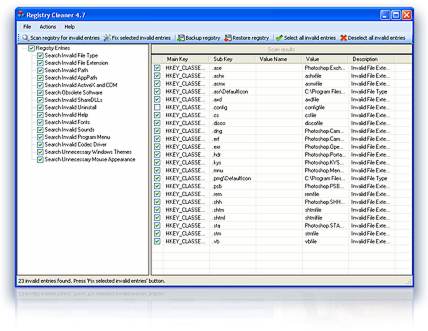
Digeus Registry Cleaner speeds up your computer by cleaning errors in your Windows. It removes the junk that accumulates in your Windows Registry, fixes Windows errors which results in speeding up your computer. With Digeus Registry Cleaner you just need a few mouse clicks and your computer will become as good as a brand new one..

Memasang File Gif Pada Posting Blog

Kali ini saya akan berbagi trik bloger yaitu bagaimana memasang file/gambar animasi berformat gif tanpa melibatkan hosting, yang langsung bisa dari postingan bloger. langsung saja caranya mudah kog yang perlu anda pesiapkan adalah browser yang anda gunakan yaitu mengunakan google chrome aja dan tentunya file animasi gif yang ingin di posting, dan hasil setelah anda memostingnya maka berfungsi dengan baik, silahkan di coba semoga bermanfaat. berikut ini contoh hasil postingan yang saya upload mengunakan browser google chrome

Audiobook

* Audiobook andrie wongso wisdom success vol 1 * Audio Book Andrie Wongso 2 * Audio Book Andrie Wongso 3 * Audio Book Andrie Wongso 4 * Audio Book Andrie Wongso 5 * Audio Book Andrie Wongso 6 .

Master Driver Pack Solution

DriverPack Solution adalah versi terbaru dari program yang paling populer untuk instalasi driver otomatis. Versi ini memiliki banyak fitur baru dan dioptimalkan untuk semua platform ( x32 – x64 ). Berkat database driver terbaru, program ini akan menginstal driver pada komputer manapun!

Showing posts with label Software. Show all posts

06 March 2012

Internet Download Manager 6.08 Build 9 - 2012


Saat ini saya akan berbagi software yaitu Internet Download Manager 6.08 Build 9. Internet Download Manager 6.08 Build 9 adalah alat untuk meningkatkan kecepatan download sampai 5 kali, dapat melanjutkan pada jadwal mingguan. Comprehensive error recovery dan melanjutkan kemampuan akan restart download yg rusak atau terputus karena kehilangan koneksi, masalah jaringan, komputer shutdowns, atau listrik padam tak terduga.Internet Download Manager 6.08 Build 9 memiliki kecepatan men-download accelerator yang baik, dinamis dan teknologi download multipart aman untuk mempercepat download Anda. Tidak seperti download manager lainnya accelerators Internet Download Manager dapat meningkatkan proses download mencapai kinerja percepatan terbaik.
bagi yang ingin mendapatkanya silahkan anda donwload aja.


DOWNLOAD


05 March 2012

Registry Cleaner


Digeus Registry Cleaner speeds up your computer by cleaning errors in your Windows. It removes the junk that accumulates in your Windows Registry, fixes Windows errors which results in speeding up your computer. With Digeus Registry Cleaner you just need a few mouse clicks and your computer will become as good as a brand new one.

Key features:

* Removes unused and invalid entries
* Speeds up boot up time
* Fixes Windows errors which results in speeding up your computer
* Eliminates BSOD (Blue Screen of Death)
* Invaluable when your system starts crashing, hangs, freezes and works slow
* This is one of the most popular registry cleaners on the Internet

Digeus Registry Cleaner

Screenshots
  main sreen
"Actions" menu
Pop-up menu
Scanning registry for errors
Download Registry Cleaner

21 February 2012

Master Driver Pack Solution 2011


DriverPack Solution adalah versi terbaru dari program yang paling populer untuk instalasi driver otomatis. Versi ini memiliki banyak fitur baru dan dioptimalkan untuk semua platform ( x32 – x64 ). Berkat database driver terbaru, program ini akan menginstal driver pada komputer manapun!
DriverPack Solution menyederhanakan proses menginstal ulang Windows pada komputer manapun. Tidak ada lagi masalah dengan mencari dan menginstal driver. Semuanya akan dilakukan secara otomatis dan dalam beberapa klik mouse. Program ini akan menginstall semua driver yang diperlukan ke komputer manapun hanya dalam waktu sekitar 5 menit.
DriverPack Solution 2011 Mendukung untuk semua sistem operasi modern seperti Windows XP / Vista / 7 ( x86 – x64 ) Baik 64-bit dan versi 32-bit!


  Download DriverPack Solution 11 

Part 01 Download | Part 09 Download 
Part 02 Download | Part 10 Download 
Part 03 Download | Part 11 Download 
Part 04 Download | Part 12 Download 
Part 05 Download | Part 13 Download 
Part 06 Download | Part 14 Download 
Part 07 Download | Part 15 Download 
Part 08 Download | Part 16 Download

19 February 2012

Driver Genius Professional 10 Portable


Driver Genius 10 Professional improves PC performance with the powerful driver manager for Windows® that backs up, restores, and updates your device drivers automatically! With just a few clicks of your mouse Driver Genius updates the drivers your system can’t find on its own! What’s more, this powerful and easy driver management tool can analyze your system and recommend suitable drivers for your PC from a database containing over 30,000+ different drivers. The database contains drivers for the vast majority of hardware devices such as motherboards, video cards, sound cards, network cards, modems, monitors, mice, keyboards, digital cameras, video capture cards etc.

Benefits

Why Do You Need Driver Genius?

When upgrading to Windows 7 or purchasing a Windows 7 compatible PC, the BIGGEST problem often facing users is that existing hardware or peripheral devices drivers aren't Windows 7 compatible. Driver Genius eliminates this issue by automatically scanning your PC, finding the problem drivers, downloading the updated drivers and fixing your PC! Driver Genius is essential to any new PC or Windows 7 upgrade purchase!

Features

Update Your Drivers The Smart and Safe Way!

Diagnose, Search, Download and Install From Over 30,000 Device Drivers.

1. Updates Drivers - Automatically detect which drivers need updating. 1 Easy Step downloads!
2. Installs Drivers - New Driver Install Wizard makes simplifies installation.
3. Backups Drivers - Detect and backup installed devices drivers for your PC.
4. Restores Drivers - Reinstalled your Operating System? Just 1 Click automatically reinstalls all your backup drivers.
5. Uninstalls Drivers - Remove old and useless drivers that harm your system and slow your PC with just a few clicks of your mouse.

Plus...

* Access the Driver Download Manager for faster and more reliable downloads
* Use View Details Link to see immediate driver update information.

30,000+ Drivers Supported

* Digital Cameras
* MP3 Players
* Motherboards
* VOIP Phones
* Video Cameras
* Modem Cards
* Printers
* CD/DVD Drives
* Video & Sound Cards
* Network Cards
* Keyboard & Mouse
* Hard Drivers
* And More!

System Requirements
Version 10
Platform Windows XP, Windows Server 2003, Windows Vista 32-bit, Windows Vista 64-bit, Windows XP 64-bit, Windows 7 64-bit, Windows 2008 Server, Windows 2008 Server 64-bit, Windows 2003 Server 64-bit, Windows 7 32-bit
Version # 10.0

* Size of ESD file in MB (if applicable) : 6.5 MB

Compatible platforms

* Windows XP (32-bit & 64-bit)
* Windows Vista (32-bit & 64-bit)
* Windows 7 (32-bit & 64-bit)
* Windows Server 2003 (32-bit & 64-bit)
* Windows 2008 Server (32-bit & 64-bit)


16 February 2012

AlienGUIse


AlienGUIse is a pack which includes a desktop theme manager and five fabulous themes with a futuristic appearance which will renew your OS interface.
The names of the themes included in AlienGUIse are: XenoMorph, Invader, Darkstar, AlienMorph, Aloenware Superman and ALXMorph.
The main modifications which will take place when you'll choose a theme will affect the start menu, system tray, wallpaper, icons and the Windows Media Player Skin.
If you want to set a theme, you'll only have to run AlienGUIse and choose the one you like the most. Finally, if you decide to go back to the original theme, just choose Windows XP Desktop from the list of themes.


24 January 2012

Camtica 4.3.72130


Camtica enables you to create professional screen recordings, presentations, tutorials and more. You can record any desktop activity with voice, webcam and animated mouse clicks. The resulting video can be saved in various formats including AVI and WMV.

Why do you need Camtica?
* To create professional screen recordings, demonstrations, presentations, screencasts, tutorials and more
* To generate effective videos that help you train, teach, sell and more
* To create demonstration videos for any software program
* To show customers how to use your product
* To create on-demand interactive training, tutorials for school or college class
* To create a set of videos answering your most frequently asked questions
* To share your recordings on YouTube, Screencast.com and other videos sites

Features:
* Records entire desktop, selected rectangle region, dynamic region around mouse cursor, webcam
* Records anything on the screen including windows, objects, menus, full screen and rectangular regions
* Records desktop screen with audio and webcam together - personalizing your videos by including a webcam movie of yourself over * your desktop at any position
* Records video chats, Skype video calls, games, flash movies played on sites
* Mouse highlighting spotlights the location of the cursor
* Records video in many video file formats including AVI and WMV
* Supports various video and audio codecs
* Free support and advice
* Free lifetime updates and upgrades
* System requirements: Windows XP/2000/2003/Vista/Windows 7

It’s easy to use as one, two, three.

You may get more information about Camtica 4.3.72130 here:
Screen Recorder Software


Camtica screenshots and features description:

This is how the main screen looks like:


Select recording mode in select area dropdown menu:


Enable or disable webcam and audio inputs by pressing on the corresponding icon:


Select webcam input device:


Webcam options menu:


In webcam options menu you can select webcam device and set coordinates with width and height of webcam region where you want to place it on the recoding in case you select recording desktop together with webcam. Here is an example of desktop region recording with webcam together:


Select audio input device:


Audio options menu:


In audio options menu you can select audio device which will be used in recoding. You can also enable or disable audio input.

Recoding dropdown menu:


Recoding options:


In recoding options select output format WMV or AVI with all codecs available. You can enable resize captured video mode and your final video will be converted to selected resolution.

In misc panel you can choose Frames Per Second (FPS) recording mode and hotkey you will press when you want to stop recording.

In mouse panel you choose if you want to record mouse cursor and if you want to highlight spotlight the location of the mouse cursor with selected color. Examples of possible cursors:


This is how desktop recording will look like with highlighted mouse cursor:


When you press Record button this window will appear notifying that you need to press F10 button to finish recoding video:


You can also stop recording by pressing stop button. This form is located in tray while video is being recorder.


After stopping recording you can save or discard it:


Let’s consider recording modes:

Full Screen


Choose Full screen mode in select area dropdown menu and press Record button.

Custom size region on the screen


Choose Custom size mode in select area dropdown menu. Then Marker Window will appear. Select the region on the screen you want to record (application, menu, even Skype video call menu to record video of your opponent and audio), then press Record button.


Custom size region on the screen around mouse


Choose Around mouse mode in select area dropdown menu. Then Marker Window will appear. Stretch the region to any size you want to make recoding around mouse, then press Record button. You may move mouse everywhere on the screen and only the area around mouse will be recorded.


Webcam only


This mode allows you to record webcam only. When you select this mode the webcam preview window will appear. Stretch this window to any size you wish. The recorded video will be selected size.


      DOWNLOAD 

11 November 2011

Master Cobra Driver Pack (Driver All In One For 7/XP/Vista)


Cobra Driver Pack 2010 adalah modal untuk seorang teknisi komputer yang mana dengan memiliki Cobra Driver semua versi driver hardware untuk windows XP, Windows Vista dan Windows 7 akan terpenuhi. Untuk komputer versi lama biasanya tidak memiliki CD driver untuk mainboard / motherboard bawaannya seperti Chipset, DirectX, LAN, Sound, USB, VGA (Graphics Card) dll. Atau anda baru saja membeli komputer second/bekas tetapi tidak memiliki CD driver hardware dan tidak tahu sama sekali tentang informasi detilnya solusinya adalah anda harus mempunyai Cobra Driver.

Cobra Driver Pack  (Driver All In One For 7/XP/Vista) 1.5 GB
Part 01 Download | Part 05 Download
Part 02 Download | Part 06 Download
Part 03 Download | Part 07 Download
Part 04 Download | Part 08 Download 

Internet Download Manager 6.07 full 2011


Internet Download Manager 6.07 (IDM) 2011 adalah alat untuk meningkatkan kecepatan download sampai 5 kali, dapat melanjutkan pada jadwal mingguan. Comprehensive error recovery dan melanjutkan kemampuan akan restart download yg rusak atau terputus karena kehilangan koneksi, masalah jaringan, komputer shutdowns, atau listrik padam tak terduga. Antarmuka pengguna grafis sederhana membuat IDM 6.07 user friendly dan mudah untuk digunakan.Internet Download Manager 6.07 memiliki kecepatan men-download accelerator yang baik, dinamis dan teknologi download multipart aman untuk mempercepat download Anda. Tidak seperti download manager lainnya accelerators Internet Download Manager dapat meningkatkan proses download mencapai kinerja percepatan terbaik. segera download IDM 6.07 dibawah ini.

DOWNLOAD

14 October 2011

Internet Download Manager 6.05 Build 3 Potable


Internet Download Manager (IDM) is a tool to increase download speeds by up to 5
times, resume and schedule downloads. Comprehensive error recovery and
resume capability will restart broken or interrupted downloads due to
lost connections, network problems, computer shutdowns, or unexpected
power outages. Simple graphic user interface makes IDM user friendly and
easy to use.Internet Download Manager has a smart download logic
accelerator that features intelligent dynamic file segmentation and safe
multipart downloading technology to accelerate your downloads. Unlike
other download managers and accelerators Internet Download Manager
segments downloaded files dynamically during download process and reuses
available connections without additional connect and login stages to
achieve best acceleration performance.

8,65 Mb  Download Free

22 August 2010

Internet Download Manager 5.19

Ingin mempercepat download!! caranya mudah yaitu salah satunya dengan menggunakan
Internet Download Manager 5.19, karena dengan menggunakan IDM 5.19 anda bisa dengan
mudah mendownload berbagai macam file video contohnya di you tube ataupun audio dan
juga file-file yang lainnya.
Baik, langsung saja bila ingin mendownload Internet Download Manager 5.19 silahkan klik
                                                                  Gambar Di bawah ini


Dan untuk serial numbernya silahkan klik icon  ini
Setelah itu cara menginstalnya seperti biasa jika ada software IDM yg versi lama gak masalah
langsung aja instal dengan Internet Download Manager 5.19 terbaru. Nah untuk penggunaan
Software serial IDM 5.19 berikut Silahkan anda letakkan Software serial 5.19.exe
Pada Folder C:\Program Files\Internet Download Manager Lalu silahkan buka Software serialnya,
Klik Software serial, setelah itu Exit serta restart komputer anda, selamat mencoba.
Atau kalau pingin tidak repot bisa di download file yang ini IDMAN.EXE

Yahoo messanger

Lebih dari sekedar ber-YM dengan  

Yahoo! Messenger 10

Panggilan video yang disempurnakan
Dengan panggilan video layar penuh dan suara berkualitas tinggi, Anda akan merasa seperti benar-benar ada di sana
Selalu tahu yang dilakukan teman-teman Anda
Lihat update terkini teman-teman Anda dari Yahoo!, Flickr, Twitter dan banyak lagi dengan tampilan “Updates” yang baru

Fitur Lainnya

  1. Berkirim pesan instan dengan seorang teman, atau berkonferensi dengan banyak orang.
  2. Temukan atau undang teman dari layanan lain dengan mudah untuk chat dengan Anda
  3. Kirim pesan teks (SMS) ke ponsel teman secara gratis*
  4. Gunakan media player built-in untuk menonton video web dan melihat foto bersama teman.
  5. Tunjukkan gaya Anda dengan emotikon, Avatar, audibel dan IMVironment
Persyaratan sistem: Microsoft Windows XP, Vista, Windows 7.

Yahoo! Messenger untuk Pengguna Internasional


17 August 2010

Shollu_3.08.2.

kali ini software yang akan saya berikan adalah shollu, yaitu sebuah software pengingat waktu sholat, Cara kerja software ini sangatlah sederhana, jika waktu sholat telah tiba atau sebentar lagi tiba software ini akan meminimize semua windows/aktifitas anda dikomputer, bahkan bisa menshoutdown (mematikan) komputer anda secara otomatis, ini tergantung anda bagaimana mengaturnya, software ini akan langsung mengumandangkan Adzan yang suaranya sangat merdu bila waktunya sholat telah tiba Suara adzannya sendiri terdiri dari 5 suara sesuai waktunya dan suaranya pun berbeda-beda. shollu_3.08.2 ini juga menggunakan koordinat wilayah ( garis lintang dan garis bujur), ketinggian dan beberapa kriteria lainnya. Pengguna hanya perlu setting sekali dan jadwal otomatis akan selalu update. Shollu dilengkapi dengan wilayah-wilayah di Indonesia dan kota-kota besar di dunia. Untuk wilayah lainnya bisa download file tambahan, bisa dilihat dalam help file, selain itu anda juga bisa mengatur bahasa yang anda sukai, adapun bahasa terdiri dari bahasa Indonesia, Banyumas, Sunda, Jawa, Inggris, dan Palembang. Dan masih banyak lagi pengaturan-pengaturan yang lain perihal Software Shollu 3.08.2 ini.Apakah anda penasaran ingin mencobanya silahkan langsung aja download softwarenya.


                                         Download